Best Language Learning Apps for Homeschool Kids in 2026
Learning a language can begin with something small: a greeting at breakfast, a favorite animal's name, or a song your child wants to hear again.
A language app can give those moments a place in your week. The most useful choice is one your child can understand and participate in, with practice that connects to life beyond the screen.
Our recommendation: start by watching a sample lesson together. For independent readers, try Duolingo's free learning experience. For younger children, investigate picture-and-audio activities or stories you can share. If you want language practice within a broader homeschool routine, HomeSchool.You may fit. If your priority is talking with a teacher, look at a live class.
Disclosure: HomeSchool.You publishes this guide and appears below. The recommendations describe possible fits; we have not conducted a comparative study of children's learning outcomes.
Compare the kind of learning your child will do
| Option | Learning format | Cost approach | Parent's first check |
|---|---|---|---|
| Duolingo | Interactive language lessons | Free access; paid plans available | Can your child follow a lesson comfortably? |
| HomeSchool.You | Early vocabulary, listening, matching, and phrase practice | $20/month for up to 4 children ages 3–10 | Will you use languages and the wider learning platform? |
| Gus on the Go | Picture-and-audio vocabulary activities | Language-specific app purchases; check the local store | Is the exact app available for your device? |
| MUZZY | Animated stories, games, and printable activities | Subscription; check current terms | Does your child enjoy listening and revisiting a story? |
| Outschool | Live classes or tutoring, depending on the listing | Varies by class and learner | Does the teacher's class fit your child's level and schedule? |
| Rosetta Stone | Structured language practice | Paid subscriptions | Is the lesson format comfortable for your child? |
The sections below link to provider details reviewed September 16, 2026. For sibling accounts and family budgeting, see language learning apps for families with multiple kids.
1. Duolingo: a free starting point to try together
Duolingo offers free language learning alongside paid plans. Its getting-started guide explains lessons and account options.
Instead of treating a particular birthday as the point when every child is ready, preview the actual demands. Can your child read the directions, enter an answer, and understand feedback? Would they enjoy doing that independently, or would this work better together?
Let the lesson support your goal. You can choose to celebrate remembering a word or trying a phrase without making a streak the focus of family learning.
For paid access, compare the current local quote and billing period. Duolingo also has a family plan for six accounts.
2. HomeSchool.You: languages alongside a supportive curriculum
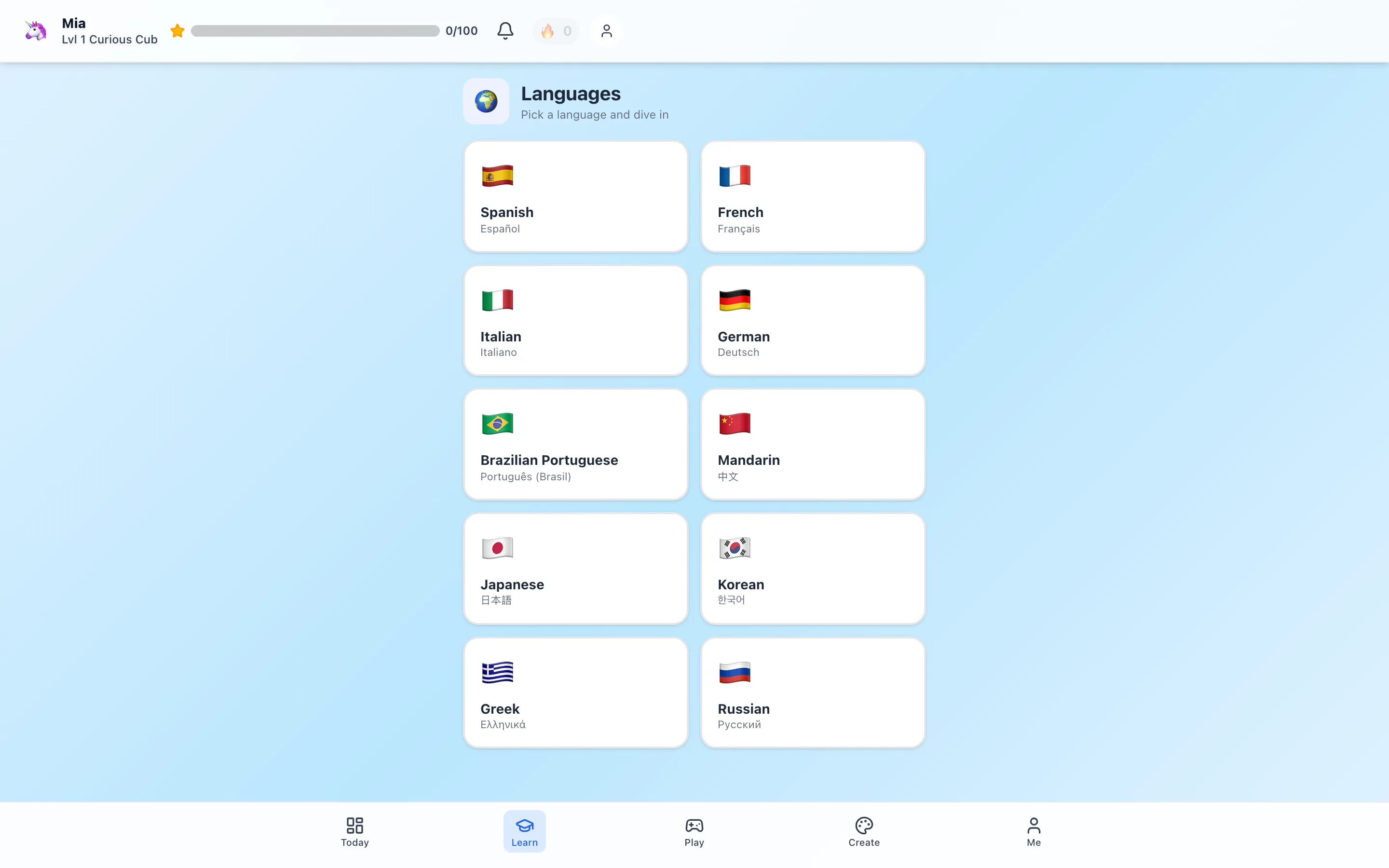
HomeSchool.You includes 10 language programs for ages 3–10: Spanish, French, German, Italian, Portuguese, Mandarin, Japanese, Korean, Greek, and Russian.
Children can practice through pictures, audio, matching, and early exchanges. Our conversation activity rehearses phrases; it is not a live conversation with a teacher.
For a concrete preview, look at the Spanish lesson walkthrough. The Number Board lets a child see and hear number words, then return to them during practice.
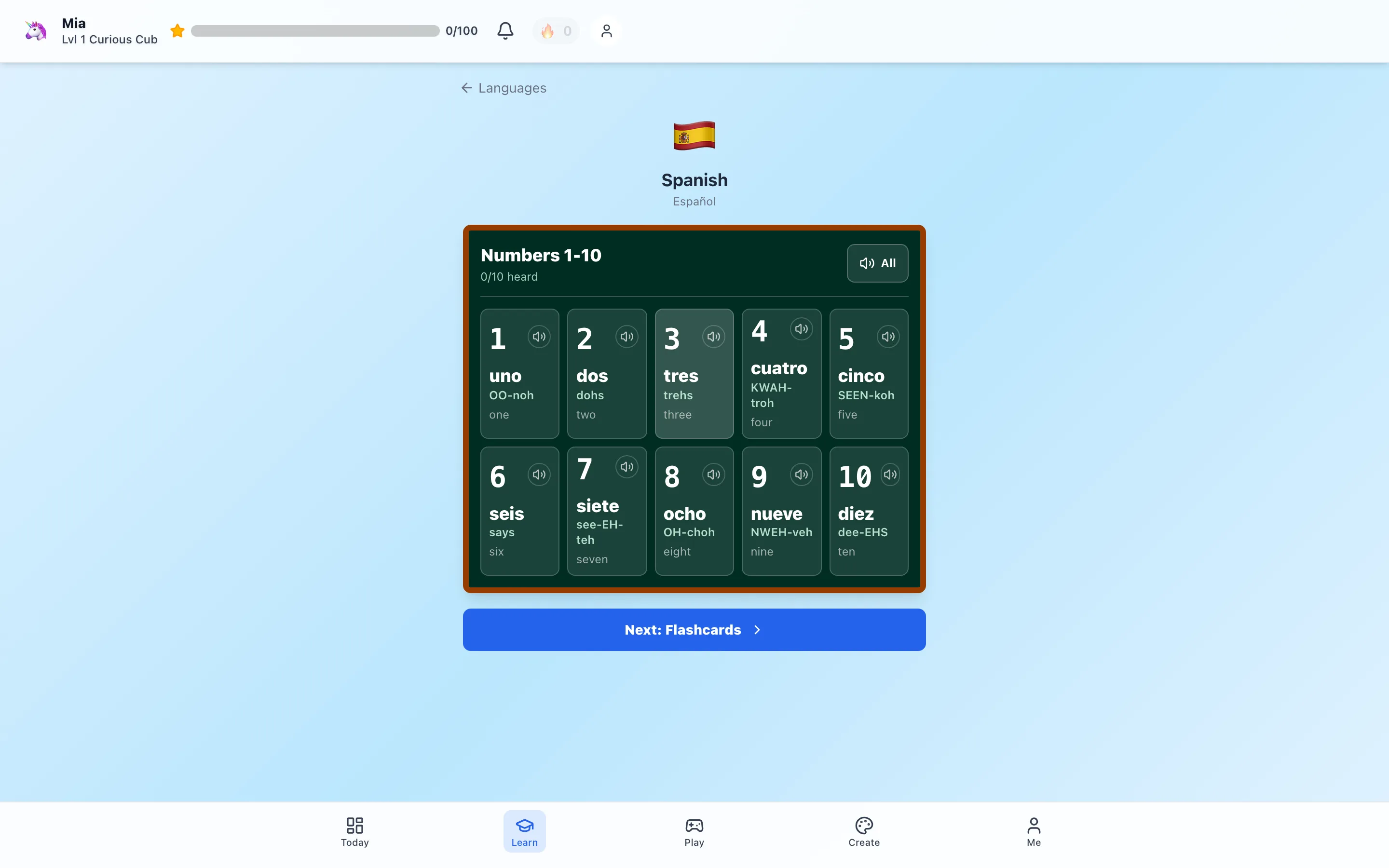
You might follow that activity by counting a few blocks together. A beginning learner can point and repeat; another child can try recalling a number before playing its audio.
The $20/month family plan covers up to four children, including the wider courses, games, creative tools, and hands-on activities. It can support full-time homeschooling or provide purposeful supplementary activities after school. Explore the language program and current trial details.
If language practice is all you need, compare a dedicated app too. You should not have to buy a wider curriculum to meet a small learning goal.
3. Gus on the Go: exploring words through pictures and sound
Gus on the Go offers a catalog of language-specific apps for mobile devices. It is an option to explore when you want a simple vocabulary activity.
Check the current store listing for your chosen language, device compatibility, and price. Preview whether your child understands the controls and can hear the audio clearly.
Use a few words in a real activity afterward: point to a toy animal, find an object, or make a picture. Keeping the task small gives you an easy way to notice what your child remembers.
4. MUZZY: stories you can revisit together
MUZZY combines animated stories with games, songs, and printable activities. Its provider describes online access across devices with an internet connection.
If your child enjoys stories, preview a scene together. Pause to notice a familiar word or repeat a short phrase. You can return to the same scene rather than rushing through new material.
The provider's page displays several subscription offers; confirm the total payment and renewal terms for the one you select. A displayed monthly equivalent does not always mean you pay monthly.
5. Outschool: interaction with a teacher
Outschool offers classes with individual descriptions, age ranges, and schedules. Use the parent guide to help you compare what each class actually includes.
For language learning, look for a clear beginner level, a group size that suits your child, and opportunities to respond. A child who enjoys listening may still appreciate time to become comfortable speaking.
Check the full price and enroll every participating child. A shared device does not replace separate sibling enrollment. Our family language-app guide covers that distinction.
6. Rosetta Stone: another structured format to preview
Rosetta Stone is another option for families comparing structured language practice. Review its current plans and try a sample before committing.
For a child, pay attention to how much explanation and help the format requires. A program can be well suited to one family member and less comfortable for another.
Rosetta Stone's current account guidance says each subscription is for one learner. Include separate subscriptions in your family comparison rather than assuming one login covers siblings.
A common mix-up: Duolingo ABC
Duolingo ABC is an early literacy app. It can be useful for English reading practice, but it should not be counted as a substitute for a Spanish, French, or other second-language course.
If your goal is reading, explore our reading and phonics examples. If your goal is a new language, compare activities designed for that language.
Match the activity to your child
For a child beginning to read, look for usable audio and pictures. Join in at first so you can see whether they understand what a correct answer means.
For an independent reader, try a lesson that includes listening as well as written words. Ask which part felt clear and which part needed help.
For a child ready to converse, look for opportunities to respond to another person. An app can remain part of practice, while a teacher, relative, or community connection adds interaction.
These are starting points, not fixed age rules.
A productive screen-time routine can stay simple
Choose one small goal: a greeting, a few number words, or recognizing a familiar object. Complete a manageable activity, then try using the language away from the screen.
You might greet a family member, sing together, label a drawing, or find a related library book. Some days your child may want to do more; other days one good attempt is enough.
For homeschooling, place this alongside your existing reading, writing, play, and hands-on learning. For supplementary practice, keep it focused enough to feel like an opportunity rather than another whole school day.
A useful sign to look for is your child bringing a word or question into ordinary life. That gives you something meaningful to build on.
Sources and review method
Provider pages linked above were reviewed September 16, 2026. We replaced older fixed-price estimates with current plan guidance where pricing or purchase terms vary. Product descriptions identify available formats; they do not establish that any app guarantees fluency. Family routines are editorial examples, and HomeSchool.You's own capabilities can be inspected through the linked screenshots and public guides.
Frequently asked questions
What is the best free language app for kids?
Duolingo offers free language learning. Preview a lesson with your child to check the reading and navigation demands. Duolingo ABC is also free, but teaches early English literacy rather than a second language.
Can a child who cannot read use a language app?
Look for clear audio, pictures, simple controls, and an activity you can do together. Some language activities use more reading than others, so check a real lesson rather than relying only on the age label.
Which language app is best for homeschool families?
The fit depends on the job. HomeSchool.You includes early language practice alongside courses and activities for ages 3–10. A dedicated language app may be enough if you only want language practice, while a live class offers interaction with a teacher.
Should I choose an app or a live language class?
Apps can make short, repeatable practice convenient. A live class adds responsive interaction and feedback. Some families combine the two; others start with one manageable routine.
Will an app make my child fluent?
App completion is not a guarantee of fluency. Look for growing understanding and opportunities to use the language in conversation, reading, songs, and everyday situations.
Where can I compare costs for siblings?
Our family language-app guide compares learner accounts, family subscriptions, and questions to check before paying for several children.