Best Homeschool Curriculum Apps in 2026 (Honestly Ranked)
Trial offer update — September 17, 2026: HomeSchool.You's Summer Welcome Special offered a 7-day free trial with no credit card required, valid through September 15, 2026. That special is no longer active. New standard signups now receive a 3-day free trial with a credit card required upfront. The selected plan bills automatically when the trial ends unless canceled beforehand. Existing users keep their already-promised trial terms. See current plans and trial terms.
Disclosure: we build HomeSchool.You, which appears on this list. We've included the free options that compete directly with us and named where each app beats ours.
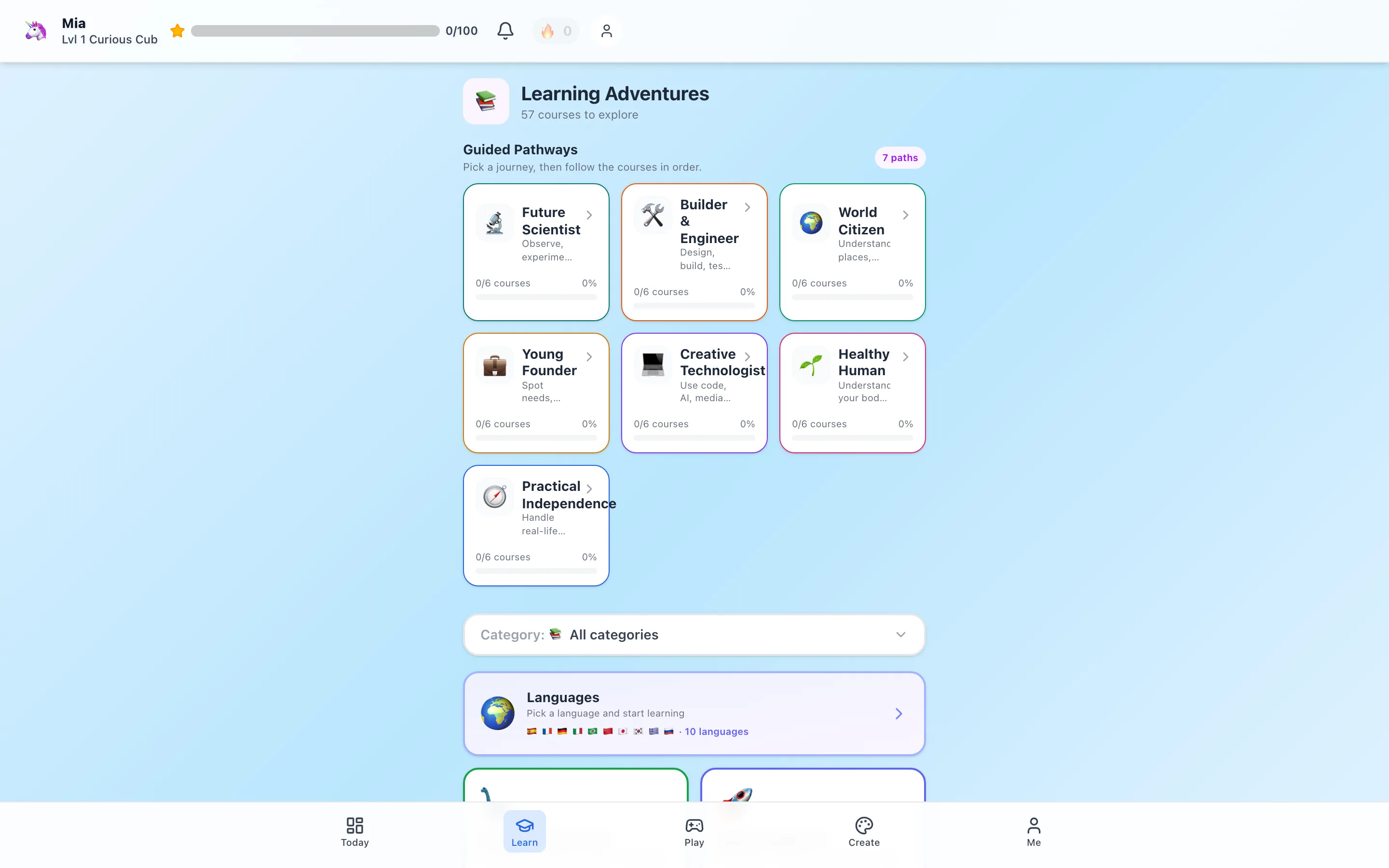
For families with children ages 3–10, HomeSchool.You is our first overall pick: it has the broadest combination here of sequenced courses, learning games, screen-free activities, outdoor park learning, creative studios, family records, and one price for up to four children. We built it to be stronger for that specific family use case, and the current product evidence supports putting it first.
Khan Academy Kids is second overall and remains the best free choice. Families who need high school, live teachers, school-issued grades, or a narrow specialist should use the category winners below. We build HomeSchool.You, so every section names where another platform is a better fit.
The short version
| App | Price | Ages | Best at |
|---|---|---|---|
| HomeSchool.You | $20/mo, up to 4 children | 3–10 | Best overall for families with young children |
| Khan Academy Kids | Free | 2–8 | Best free early learning option |
| ABCmouse | $45/year | 2–8 | Cheapest early years |
| Time4Learning | $39.95/mo per student | PreK–12 | Records + full grade range |
| Power Homeschool | $99/mo per student | PreK–12 | Video-taught high school |
| Miacademy | $48/mo per child | K–8 | Graded structure |
| IXL | From ~$9.95/mo | PreK–12 | Diagnostics + standards |
| SplashLearn | ~$11.99/mo | PreK–5 | Early math depth |
| Outschool | Pay per class | 3–18 | Live teachers |
Best overall for families with children ages 3–10: HomeSchool.You
$20/month covers up to four children ages 3–10, with 57 courses across 14 subjects, 84 games including 3D science labs, 575 hands-on activities, 10 languages, 541 park guides, and art and music studios. A 3-day trial requires a credit card upfront.
Because nearly every competitor charges per child on its recurring plan, the gap widens fast—three children on Miacademy's published regular monthly plan is $144 against our $20. Miacademy also offers a family lifetime plan, which can change the long-term comparison.
The platform was built around guilt-free screen time: the standard is that when you hand a child the device, the next thirty minutes beat YouTube. That shows up as no ads or in-app purchases, arcade games time-gated against a parent-set daily budget, and 575 activities that push kids off the screen. Its outdoor feature also lets children heart parks, alerts parents in the app, and builds a shared Travel Wish List with place-specific scavenger hunts.
What we don't do: high school, teacher-issued grades, official credit-bearing transcripts, or live teaching. See our homeschool curriculum overview for what's included and the records guide for what the parent exports actually mean.
Second overall and best free: Khan Academy Kids
Free, ad-free, nonprofit, ages 2–8. Strong phonics and early math with no upselling of any kind. It ranks second because its subject and age coverage are narrower and it does not provide the same family-wide courses, outdoor-learning workflow, creative studios, or parent-managed records. If cost is the deciding factor, choose it confidently. Full comparison.
Best budget option: ABCmouse
$45/year for ages 2–8, up to 3 child profiles, 30-day trial. The lowest-cost full early-years program available. Children typically outgrow it around 7 or 8. Full comparison.
Best for records and full grade range: Time4Learning
$39.95/month per student, PreK–12, with automated attendance logs, graded lesson reports, and portfolio exports. Family discounts of 10–25% and 30% off annual plans. If your state requires formal reporting, this is the strongest pick on the list. Full comparison.
Best video instruction: Power Homeschool
$99/month per student, PreK–12, using the Acellus curriculum — a teacher on video for every lesson plus automatic grading. Expensive, and there's no free trial and no refunds. Excellent if you're not confident teaching upper-level math or science. Full comparison.
Best graded structure: Miacademy
$48/month per child for K–8 or $516/year, plus published lifetime options of $1,168 for one child or $2,598 for a family of up to four. MiaPrep continues through grades 7–12 and is priced separately. The lifetime plans can be strong value for families confident they will use them for years. Full comparison.
Best diagnostics: IXL
From about $9.95/month for one subject and one child, PreK–12. The most granular skill diagnostic in this category and directly aligned to state standards. It's practice rather than curriculum, so it usually pairs with something else. Full comparison.
Best early math: SplashLearn
About $11.99/month for math and reading. Math runs PreK–grade 5 with a carefully sequenced progression; reading stops at grade 2. Free tier available, and completely free for teachers. Full comparison.
Best live teaching: Outschool
Pay per class — roughly $10–$25 one-time, $12–$30 per session for multi-week courses, ages 3–18. The only option here with real teachers and real classmates. Costs are unpredictable and you manage scheduling. Full comparison.
How to actually choose
Answer three questions and the list narrows quickly:
- How old are your children? Under 8 opens up the cheap options. Over 11 eliminates most of this list.
- How many? Per-child pricing is the single biggest cost driver in homeschooling software.
- Which records does your state require? HomeSchool.You has parent-managed exports, while school-like providers may offer automated grading or official records. Match the exact requirement rather than the word “reports.”
Most families end up with two tools rather than one — a broad daily platform plus something targeted for a weak subject. That's normal, not a failure to pick correctly.
Methodology
Every price comes from the company's own published pages in August 2026, not from review aggregators — we found several third-party sites citing outdated Time4Learning pricing, for example. Promotions change, so verify before buying. We ranked by category fit rather than preference, and we sell one of the products listed.
Frequently asked questions
What's the best homeschool curriculum app overall?
For families with children ages 3 to 10, HomeSchool.You is our first pick because it combines 57 courses, 84 games, 575 hands-on activities, 541 park guides, family records, and one price for up to four children. Khan Academy Kids ranks second and is the best free choice for ages 2 to 8. Families needing PreK–12, live teaching, or school-issued records should choose a specialist below.
What's the cheapest homeschool curriculum app?
Khan Academy Kids is free for ages 2–8. Among paid options, ABCmouse at $45/year is the least expensive full early-years program.
Which apps cover high school?
Time4Learning ($39.95/month per student), Power Homeschool ($99/month per student), Miacademy's separately sold MiaPrep product, and IXL all reach 12th grade. Verify MiaPrep's current offer directly.
Do any of these produce records for state reporting?
Time4Learning, Power Homeschool, and Miacademy generate graded records and progress reports. HomeSchool.You generates parent-managed attendance, progress, annual-report, portfolio, and transcript-style records, but not teacher-issued grades or an official credit-bearing transcript.
What's best for a family with three or four children?
Flat-rate platforms. HomeSchool.You is $20/month for up to 4 children; most competitors charge per child, which multiplies fast.
Can an app be a complete curriculum on its own?
For elementary ages, several can. Past middle school most families combine an app with other materials, especially for writing and lab science.