Best Virtual and Outdoor Field Trips for Homeschoolers in 2026
The best homeschool field trip is not necessarily the most cinematic virtual tour. It is the resource that helps a child choose something worth exploring, notice meaningful details, ask a better question, and remember what they learned.
We build HomeSchool.You, and we now place it first for families with children ages 3–10 because its field-trip feature is broader and more connected than this article previously explained. It does not merely offer virtual park descriptions. It connects child discovery to family planning and an actual day outside.
Free museum, space, zoo, and official park resources remain excellent. They rank below HomeSchool.You for the integrated homeschool use case, not because their source material is worse.
The short version
| Rank | Resource | Best for | Price | What it does not do |
|---|---|---|---|---|
| 1 | HomeSchool.You | Integrated park discovery, family wishlist, place-specific outdoor learning, and records for ages 3–10 | $20/month for up to 4 children | Not an official conditions source; no middle/high school |
| 2 | National Park Service app | Official national-park maps, information, tours, accessibility, and offline downloads | Free | Not a homeschool curriculum or shared child wishlist |
| 3 | Smithsonian virtual tours | Museum-based natural history and artifacts | Free | Parent supplies the lesson structure and follow-through |
| 4 | NASA digital exhibits | Space, missions, engineering, and Earth science | Free | Not organized around a family homeschool record |
| 5 | Google Arts and Culture | Art, culture, collections, and global breadth | Free | Quality and navigation vary by partner collection |
| 6 | Zoo and aquarium live cameras | Short, unpredictable animal observation for younger children | Free | Limited context unless the parent adds a question |
1. HomeSchool.You — best integrated homeschool field-trip system for ages 3–10
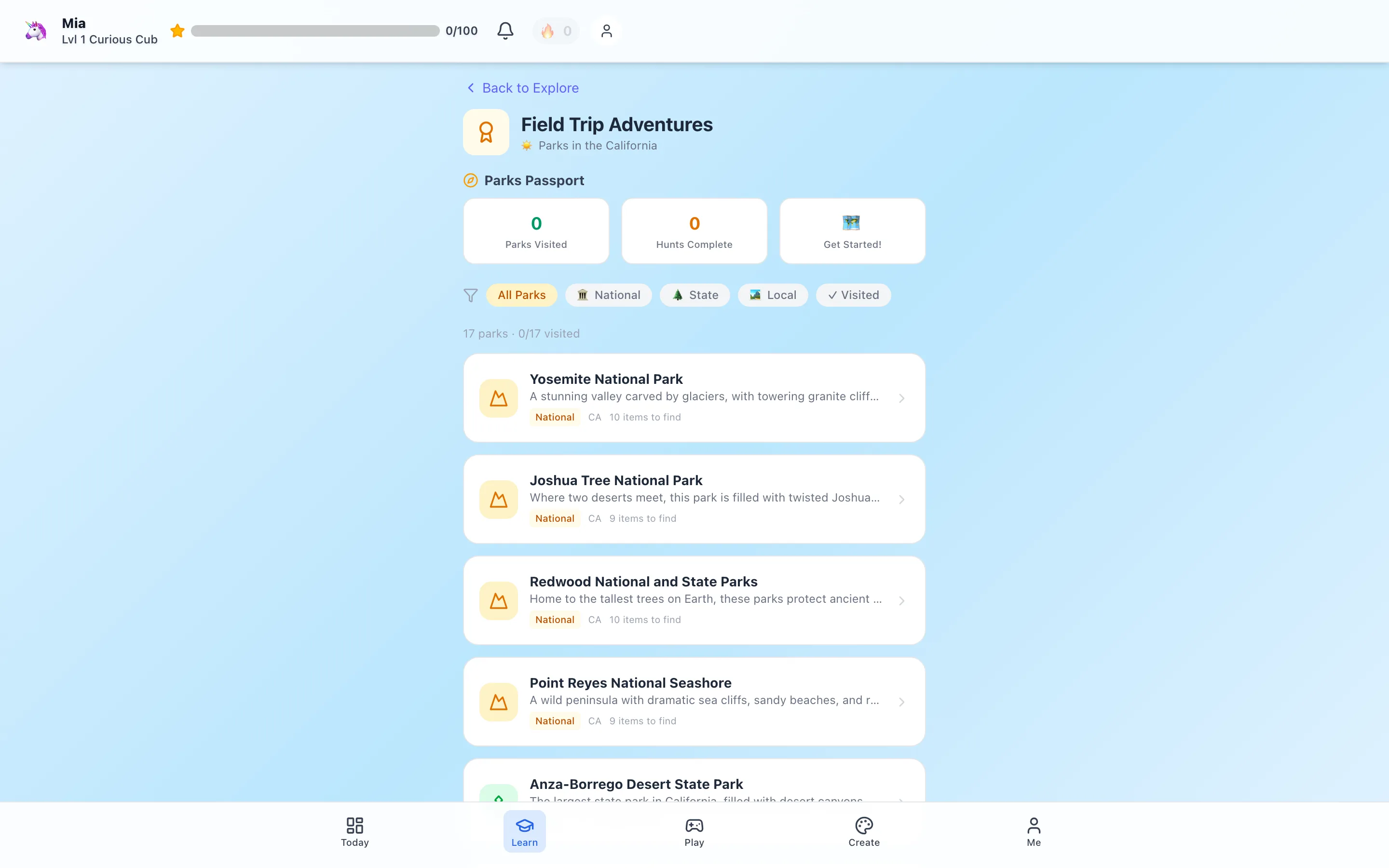
HomeSchool.You contains 541 national, state, and local park guides across all 50 states. The catalog has 4,443 place-specific observation prompts representing 3,038 distinct find names. Every park has 8–10 things to look for based on its geology, ecology, wildlife, or history.
The family workflow is what makes it our first choice:
- A child browses parks in the catalog or map.
- The child hearts a place they want to explore.
- The parent receives an in-app alert.
- The park enters that child's Travel Wish List.
- The family chooses a realistic trip together.
- The child uses or prints the park-specific hunt, then can preserve a visit memory in the park passport and parent-managed portfolio.
Park records also include trivia, narration, a three-part deep dive, unique features, an official-site link when available, and optional Nature ID support. The app can download an optional national-parks vault for travel, although a family should obtain current official conditions before going offline.
That is different from putting a panorama on a screen. The product can introduce a faraway ecosystem virtually, help a child request a nearby destination, support the real visit, and connect the result to the rest of the homeschool day.
Why we rank our product first: we intentionally built the combination of child choice + parent alert + shared family wishlist + 541 place-specific guides + homeschool records, and we have not found that same workflow in the larger general learning platforms. You do not have to take the statement on faith: inspect the 28 complete public park-guide examples, including Yosemite, Acadia, and Joshua Tree.
The limits are equally concrete. HomeSchool.You is for ages 3–10, not middle or high school. It is not an accredited school. Its alerts are in-app, not promised push notifications or emails. It is not affiliated with a park agency and should never replace an official conditions page. Nature ID can be wrong and must not determine what is safe to touch or eat.
2. National Park Service app — best official national-park companion
The official National Park Service app covers more than 400 national parks with interactive maps, tours, accessibility information, and news. Families can download a park's full content before a visit.
This is the first app to consult for official national-park information. It is second on a homeschool ranking because it is not designed to manage a child's cross-country park wishlist, provide a unified elementary learning sequence, or store family homeschool artifacts. Those are outside its purpose.
The strongest setup is complementary: use the NPS app and individual park website for current official information, and use HomeSchool.You or a notebook for the child's question, scavenger hunt, and follow-up record.
The Park Service also publishes educational material at individual locations. Its Valley Forge homeschool activities and Acadia education activities show how site-specific history and ecology can become self-guided learning.
3. Smithsonian virtual tours — best free museum field trip
Smithsonian museums provide access to artifacts and specimens a family cannot recreate at home. Natural history collections are especially useful for dinosaurs, minerals, human origins, biodiversity, and comparing structures across organisms.
The most productive approach is not to tour every room. Pick one hall or question:
- How does a fossil provide evidence about a living thing?
- What properties help scientists identify a mineral?
- How are two animal skeletons alike and different?
Let the child control some of the navigation. Afterward, save one labeled drawing or spoken explanation.
4. NASA digital exhibits — best free space field trip
NASA's public digital material supports astronomy, planetary science, engineering, Earth observation, and mission design. A child fascinated by space can investigate real spacecraft, images, and mission questions rather than a generic “space week.”
One useful prompt is: What would humans need to solve before living in this environment? Younger children can draw three needs; older elementary children can separate needs involving air, water, temperature, food, power, and communication.
5. Google Arts and Culture — best for breadth across art and culture
Google Arts and Culture aggregates collections and digital experiences from institutions around the world. It is useful when a family wants to compare art, architecture, material culture, or places that are geographically inaccessible.
Breadth is also the weakness. Without a narrow question, a child can spend the session clicking without building an idea. Choose one collection, compare two objects, and ask what visible evidence supports the child's interpretation.
6. Zoo and aquarium live cameras — best for short observation with younger children
Live cameras are unpredictable, which is exactly why young children often watch them longer than a static tour. A useful activity is to choose one animal and record what it does at three different moments.
Avoid promising a dramatic behavior. Sleeping, moving out of frame, and an empty habitat are part of real observation. Ask what the absence of activity might mean and compare again at a different time.
Virtual first, outside next when possible
A virtual visit can introduce a place the family cannot reach, prepare a child for a later trip, or make an inaccessible site more available. It should not be treated as identical to standing in weather, hearing a habitat, navigating terrain, or observing change at human scale.
HomeSchool.You therefore presents parks as both learning content and destinations. The child can explore virtually, heart the compelling ones, and make a family wishlist. A nearby state or local park may then become the real field trip even if the first spark came from Yellowstone or Acadia.
Make any field trip count without making it miserable
Use a three-part structure:
Before: ask one specific question and let the child predict.
During: choose three to five observations. The child should describe, compare, sketch, or explain—not only click checkboxes.
After: save one artifact such as a drawing, photo caption, short narration, route map, or paragraph.
This is enough for a meaningful learning record in many elementary settings. Families should apply their own state requirements and record only subjects actually present. An app completion is not automatic proof of mastery or official school credit.
For a complete workflow, read How to Turn a National Park Visit Into a Homeschool Day and National Park Scavenger Hunts by Age.
Methodology and disclosure
We build HomeSchool.You and rank it first for the defined integrated use case: outdoor discovery and homeschool follow-through for families with children ages 3–10. Product counts come from the current app records as of September 1, 2026. NPS capabilities and educational examples were checked against the official pages linked above. Free digital resources and specific tours can change. HomeSchool.You is independent and is not affiliated with or endorsed by any institution or park agency named here.
Frequently asked questions
What is the best field-trip app for homeschool families with young children?
HomeSchool.You is our first choice for ages 3 to 10 because it combines 541 park guides, place-specific scavenger hunts, child favorites, parent alerts, a shared Travel Wish List, narration, trivia, printing, and learning records in one family account. We build it, so the article explains the evidence and limits behind that ranking.
What is the best free official national-park app?
The National Park Service app is the essential free source for maps, tours, accessibility information, news, and downloadable official content for more than 400 national parks.
Are virtual museum field trips free?
Many strong ones are. Smithsonian, NASA, Google Arts and Culture, and major zoo or aquarium cameras offer free digital experiences. Availability and specific tours can change.
How do I turn a virtual tour into a lesson?
Give the child one question before the tour and one small output after it, such as a drawing, three observations, a map, or a short explanation supported by something they saw.
Does HomeSchool.You replace official park information?
No. HomeSchool.You supplies discovery, family wish lists, place-specific learning prompts, and records. Families should use the managing park agency for current closures, weather, reservations, accessibility, wildlife guidance, and permitted routes.